Lezzoo.
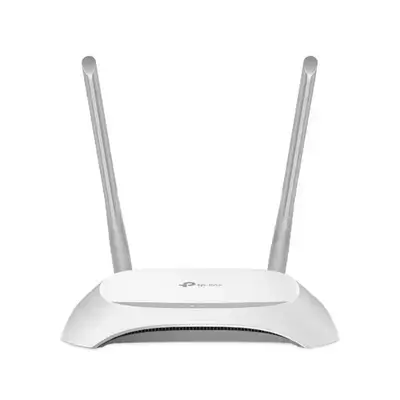
TP-Link WR840N
from Darin Game · Erbil
46,000 IQD
In stock
The TP-Link WR840N is an entry-level wireless router designed to provide simple, reliable Wi-Fi for everyday home internet use. It’s a 300 Mbps Wireless N (Wi-Fi 4) router that’s ideal for basic online activities like browsing the web, streaming HD videos, connecting smart devices, and light online gaming — all at an affordable price point. TP-Link ⚡ Performance & Wi-Fi Wireless Speed: Up to 300 Mbps on the 2.4 GHz band (802.11n), which is sufficient for typical home usage. TP-Link Wi-Fi Standard: Supports IEEE 802.11n/b/g (Wi-Fi 4) for broad compatibility with older and newer devices. TP-Link Frequency Band: Operates on the 2.4 GHz band, which provides good range and wall penetration. TP-Link Antennas: Two fixed antennas help distribute the wireless signal throughout a small to medium-sized home. TP-Link ? Ports & Connectivity Ethernet Ports: 1 × 10/100 Mbps WAN port — connects to your modem or uplink device. static.tp-link.com 4 × 10/100 Mbps LAN ports — for wired connections to PCs, smart TVs, or other devices. static.tp-link.com WPS Button: For quick and secure wireless setup. static.tp-link.com ? Security & Management Wireless Security: Supports WPA/WPA2 and WEP encryption to help protect your Wi-Fi network from unauthorized access. i4wifi.eu Guest Network: Allows you to create a separate Wi-Fi network for guests without exposing your main network. TP-Link Parental Controls: Helps manage and restrict internet access for specific devices or schedules. TP-Link Tether App: Easy setup and remote network management via TP-Link’s mobile app. TP-Link ? Modes & Flexibility The WR840N supports multiple operating modes for versatile deployment: Router Mode — standard home wireless router setup. TP-Link Access Point Mode — turns a wired network into a Wi-Fi hotspot. TP-Link Range Extender Mode — helps boost existing Wi-Fi coverage. TP-Link WISP Mode — connects wirelessly to an ISP and shares that connection. TP-Link ? User Experience The TP-Link WR840N is meant to be easy to install and manage even for non-technical users. Its intuitive web interface and TP-Link Tether app make setup, network monitoring, and parental control configuration straightforward. It’s a good choice for homes and small offices that want basic, dependable Wi-Fi without advanced features.
Bringing you time back.
Food. Groceries. Games. Social. AI. Payment. And so much more.